
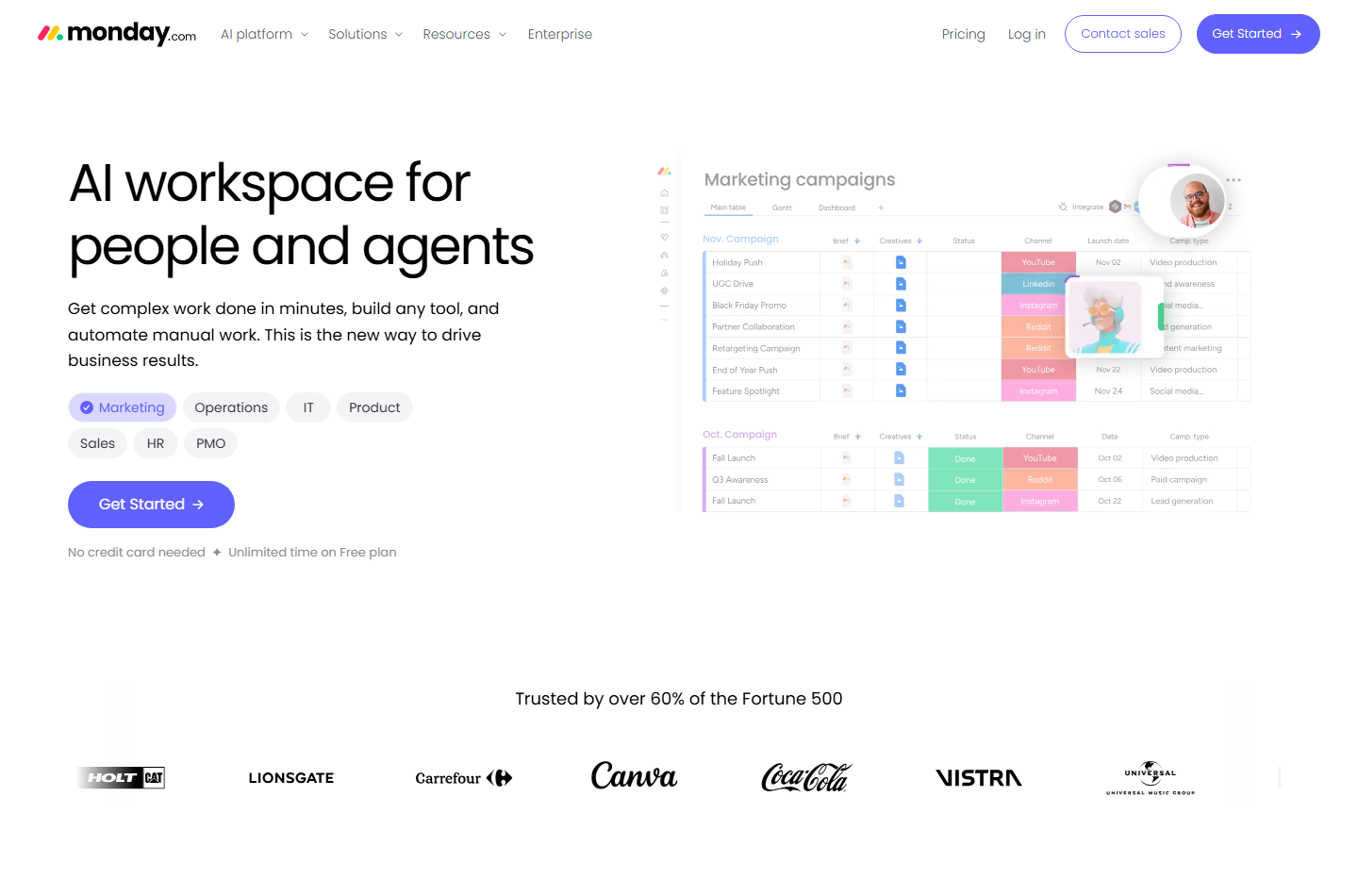
monday.com sells four separate products built on one board-and-automation engine. It suits teams that want visual project tracking without writing code. It suits two-person teams badly, because the Free plan stops at two seats and paid plans start at a three-seat bucket.
This review is built from monday.com's own pricing page, its help center and published user reviews, all checked on October 16, 2026. Every figure below is quoted with the page it came from.
We did not run tests of our own; grades come from documentation, pricing pages and verified user reports checked on that date. For the method behind numbers like these, read our note on how to read an AI tool pricing page.
The short verdict: strong platform, unforgiving pricing floor
monday.com scores well on breadth and badly on cost predictability. The board engine, automations and dashboards are genuinely deep. The seat buckets and the two-seat Free plan push very small teams into paying sooner than they expect.
Reasons to buy
- Free forever, with no card. The homepage states "No credit card needed" and "Unlimited time on Free plan", checked October 16, 2026.
- Four priced products on one engine. Work management, CRM, dev and service share boards, automations and dashboards, per monday.com's help center.
- Real automation volume at Pro. The Pro tier lists 25,000 automation actions and 25,000 integration actions per month, per the pricing page.
Reasons to avoid
- The Free plan is a two-seat demo. Three boards, 200 items in total, no automations, no guests and 500 MB of storage, per the help center.
- You buy seat buckets, not seats. Plans start at three seats and rise in multiples of five, so a six-person team pays for ten.
- Support is the loudest complaint. monday.com is rated 2 out of 5 on Trustpilot, checked October 16, 2026.
What monday.com actually is
monday.com is a database dressed as a spreadsheet. Work lives in boards made of items and columns. Views, dashboards and automations all read from those boards, so the structure you pick on day one shapes everything after it.
The homepage lists five packaged products on that engine: monday work management, monday CRM, monday dev, monday campaigns and monday service, checked October 16, 2026.
The help center describes work management, CRM, dev and service as four standalone priced products. Each can sit on a different plan and seat count, but all bundled products must share one billing cycle.
That matters more than any feature list. Buying CRM does not get you work management. Teams wanting both pay two subscriptions, which is the sharpest difference from an all-in-one such as Notion.
The feature ladder is also narrower at the bottom than it looks. The help center puts timeline view, the Gantt chart, Search Everything, shareable boards and up to three free guests on Standard, not Basic.
Two Gantt features sit higher still. The help center states that milestones and critical path are Pro and Enterprise only, which is worth knowing if Gantt is the reason you are buying.
Who it is best for, and who should skip it
monday.com fits teams that already have a process and need it visible to everyone at once.
- Marketing and operations teams of ten or more running campaigns across several owners and deadlines.
- Agencies needing client-facing guest access, which the help center places on the Standard plan and above.
- Teams leaving spreadsheets who want timeline, Gantt and calendar views without hiring a project manager.
- Sales teams choosing a visual pipeline, though monday CRM is priced separately; weigh it against our guide to AI tools for sales teams.
- Product and dev teams wanting sprints and roadmaps on the same engine as the rest of the business.
- IT and support desks that need ticketing with a customer portal attached.
Who should skip it
- Solo operators and pairs. The two-seat Free plan has no automations at all; start with our picks for solopreneurs instead.
- Teams of four or six. Bucket pricing makes you buy five or ten seats regardless.
- Anyone who needs fast human support. Published reviews point the other way, as covered below.
What the Free plan includes, and where it stops
The Free plan is a demo with a long expiry, not a working tier. Signing up starts a 14-day Pro trial automatically, and the help center states the trial cannot be extended and needs no card.
The pricing page lists Free at $0 for up to 2 seats, with up to 3 boards, up to 3 Docs, 200+ templates, 8 column types and the iOS and Android apps, checked October 16, 2026.
The help center article on the Free plan is blunter. It caps the whole account at 200 items, allows no viewers or guests, limits each dashboard to one board and provides 500 MB of storage.
It also excludes automations and integrations entirely, withholds the formula, time tracking, progress tracking and files columns, and cannot install monday CRM or monday dev.
The honest read: use Free to learn the board model, not to run a team on it.
How the pricing works: buckets, tiers and what each unlocks
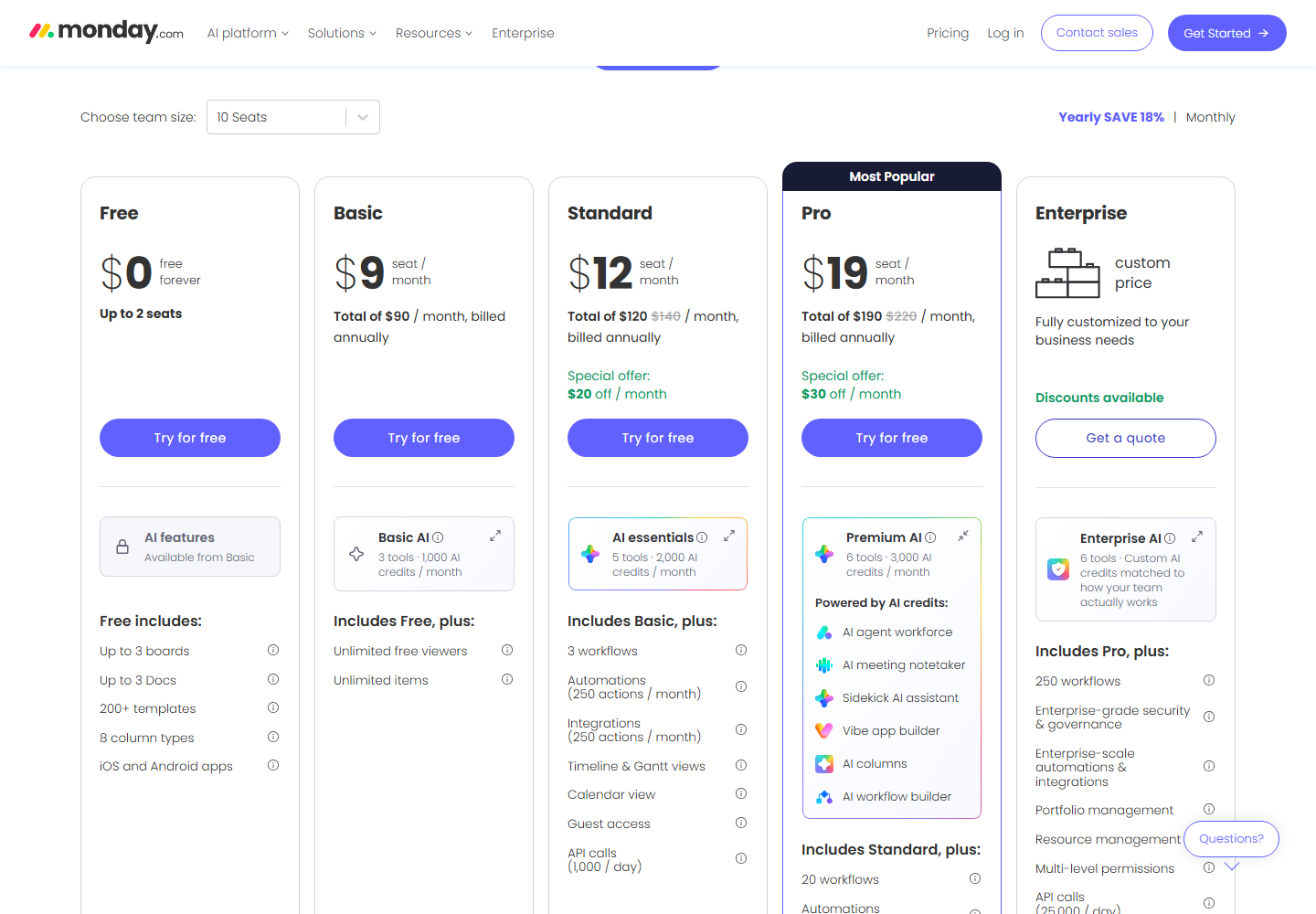
Every price below was read from monday.com's pricing page on October 16, 2026, with the team-size selector on 10 seats.
On yearly billing, the work management tiers listed $9, $12 and $19 per seat per month for Basic, Standard and Pro. The page showed those as totals of $90, $120 and $190 per month billed annually. Enterprise is quote-only.
Two of those carried a discount on the day we checked. Standard showed $120 struck through from $140 with "Special offer: $20 off / month". Pro showed $190 from $220 with "$30 off / month".
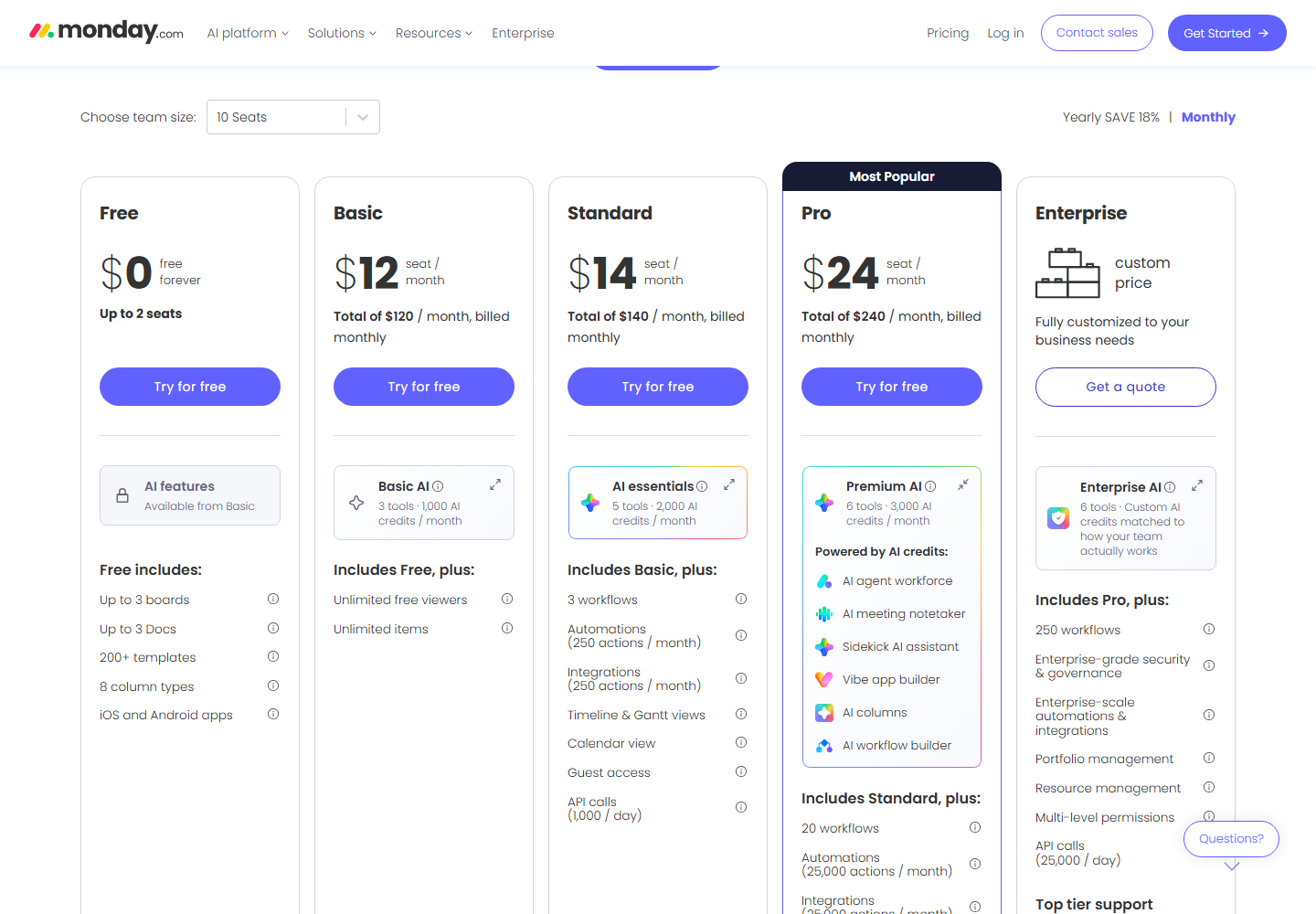
Switching the same page to monthly billing raised the per-seat prices to $12, $14 and $24, for totals of $120, $140 and $240 per month at 10 seats.
The toggle is labelled "Yearly SAVE 18%", and the help center repeats that yearly includes an 18% discount. Our arithmetic on the listed figures gives a wider spread: roughly 25% on Basic, 14% on Standard and 21% on Pro.
Seats are the other trap. The help center calls it bucket pricing: plans start at a minimum of 3 seats and ascend in multiples of 5. A team of four buys five seats; a team of six buys ten.
Tiers climb mainly on automation volume. Standard lists 250 automation actions and 250 integration actions a month with 1,000 API calls a day. Pro lists 25,000 of each and 10,000 API calls a day.
Enterprise adds 250 workflows, portfolio and resource management, multi-level permissions and 25,000 API calls a day, per the same page.
AI is metered on its own counter. Basic includes 1,000 AI credits a month, Standard 2,000 and Pro 3,000, per the pricing page. The help center adds that every account gets a one-time trial of 6,000 AI credits.
The other products carry their own price lists. On the same page, monday CRM at 3 seats on yearly billing showed Basic at $12, Standard at $17 and Pro at $28 per seat per month, with Ultimate quote-only.
monday service was dearer again: Standard at $31 per seat per month, displayed as a total of $93 per month billed annually at 3 seats. Running work management and service together means paying both lines.
One footnote is easy to miss: "Prices do not include tax. The price is determined by the user's billing country." Your invoice can land above the number on the page.
What published user reviews say
This section reports what other people published, not our own trial. Read it as signal rather than proof.
monday.com is rated 2 out of 5 on Trustpilot, a score Trustpilot labels "Poor", checked October 16, 2026. The page did not expose a readable review total when we fetched it, so we are not quoting one.
The complaints cluster tightly. Recent reviews on that page raise slow or AI-only support, prorated refunds, cost escalation on upgrades, and daily API limit errors that broke apps built inside monday.com's own Vibe builder.
Favourable reviews on the same page praise the product itself. One recurring shape is "the product is fantastic, the support is useless", which matches the split in the scores.
Trustpilot skews toward complaints for most software vendors, so treat 2 out of 5 as a support warning rather than a verdict on the boards.
Alternatives, and when to pick them instead
Notion
Choose Notion if your work is documents, wikis and light tracking, and you would rather pay one subscription than two. Otherwise choose monday.com when you need automation volume and Gantt views a doc tool will not give you.
Reclaim.ai
Choose Reclaim.ai if the real problem is calendar time rather than project visibility. Otherwise choose monday.com when several people need to watch the same pipeline move.
Lindy.ai
Choose Lindy.ai if you want agents running workflows instead of a board to look at. Our Notion vs Lindy.ai comparison covers that trade-off, and our note on babysitting an AI agent covers the upkeep.
If meeting notes are the real job
monday.com bundles an AI meeting notetaker from Standard upward. If notes are the main reason you are shopping, price it against Otter.ai and Fireflies.ai first. Our best AI meeting tools guide and Otter.ai vs Fireflies.ai do that maths.
Frequently asked questions
Is monday.com free?
Yes, with hard limits. The Free plan costs $0 for up to 2 seats and allows 3 boards, 200 items across the whole account, 500 MB of storage and no automations or integrations, per monday.com's help center, checked October 16, 2026.
How long is the monday.com free trial?
Fourteen days. Signing up starts a 14-day Pro plan trial automatically, with no credit card required. The help center states trials cannot be extended, and that the account deactivates rather than charging you if you do not upgrade.
How much does monday.com cost for a team of 10?
Per the pricing page on October 16, 2026, at 10 seats on yearly billing: Basic totals $90 a month, Standard $120 and Pro $190. The same page on monthly billing totals $120, $140 and $240. Tax is added on top.
Why am I paying for seats nobody uses?
Because monday.com sells seat buckets. The help center states plans start at 3 seats and ascend in multiples of 5, so a team of four buys a 5-seat plan and a team of six buys a 10-seat plan.
Is monday CRM included with monday work management?
No. The help center lists them as separately priced products. monday CRM Basic showed $12 per seat per month on yearly billing at 3 seats, checked October 16, 2026, and that sits on top of any work management plan.
Is monday.com worth it in 2026?
For teams of ten or more that need automation volume and shared visibility, yes. For teams under five, the seat buckets and the two-seat Free plan make the effective price high next to lighter tools.
Bottom line
monday.com earns its reputation on the engine, not the invoice. Boards, automations and dashboards hold up well for teams that already know their own process.
Price it honestly before committing. Work out your seat bucket first, add a second subscription if you need CRM or service, then add tax on top.
Run the 14-day Pro trial and build one real workflow. Check whether 250 automation actions a month on Standard will carry it. If not, Pro is your real price, not Standard.
Sources, all checked October 16, 2026: monday.com/pricing; the monday.com homepage; the support.monday.com articles "Plans and pricing for monday.com", "All about the monday.com free trial", "Understanding the Free Plan" and "Available plan types on monday AI work platform"; and Trustpilot's monday.com page.
Community discussion
Enjoyed this story? Share your thoughts below.